Need help reproducing a focus issue

December 21st, 2005

We're still seeing reports of typing ' bringing up the Find bar when it shouldn't, mostly when users are trying to type email messages. Aaron Leventhal, Blake Kaplan, and Johnny Stenback fixed a bunch of bugs like that in the betas leading up to Firefox 1.5, but apparently there's at least one bug like that left.

None of those bug reports have steps to reproduce that work for me in Firefox 1.5, but there are enough reports that I think it's a real problem. Steps to reproduce that I can use to reproduce the(?) bug would be great, and so would a minimal testcase.

Microsoft crash reporting and Firefox

December 18th, 2005

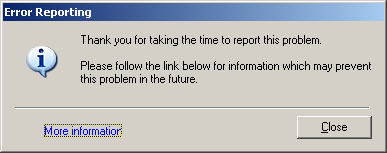
I made Firefox crash a few times while investigating reports of crashes in Bugzilla. One of those times, I sent the Windows XP crash report to Microsoft in addition to sending the Talkback report to the Mozilla Foundation. To my surprise, I got a dialog after submitting the Windows XP crash report. The dialog contained a link to a Microsoft web page, which said:

Contact Mozilla Firefox for support or product updates

Thank you for submitting an error report.

Problem description

An analyst at Microsoft has investigated this problem and determined that an unknown error occurred in Firefox. This software was created by Mozilla Firefox.

Solution

Microsoft has researched this problem with Mozilla Firefox, and they do not currently have a solution for the problem that you reported. Below is a list of recommendations to take that may help prevent the problem from recurring.

Additional information

If this problem continues to occur with the latest product updates for Firefox, we recommend you obtain assistance and troubleshooting information directly from Mozilla Firefox.

According to Talkback, the crash I hit is obscure: only 2 other reports in the last two weeks had the same function at the top of the stack, out of the tens of thousands of Firefox 1.5 crash reports during that period.

Did Microsoft happen to investigate an obscure crash that I hit? Since the page gets our name wrong and doesn't say anything helpful, I'm inclined to believe that they haven't investigated this crash, and that the page is incorrect in stating that Microsoft has contacted Mozilla about the crash. The page almost makes it sound like the crash I hit is frequent enough for Microsoft to care and that Mozilla has refused to fix it.

New bookmarklet: Make img tag

December 3rd, 2005

The new "make img tag" bookmarklet creates XHTML code to include an image, including the correct width and height attributes. Use it when Firefox is just showing the image, e.g. after dragging the image to a Firefox window or after using the View Image context menu item. I wrote it to save me time when I include images in my blog posts.

Pornzilla update

December 3rd, 2005

I added 5 extensions to Pornzilla. The new extensions are:

  • Browse Images - Use the Forward button or Alt+Shift+Right to go to the next image.
  • Location Navigator - Select a portion of a URL that varies, then navigate up or down.
  • Launchy - Open links to video files in an external player, streaming, so you can watch a video without waiting to download it. (Note that not all video players support streaming video; for example, WinAmp 5.111 hangs. VLC works well. Here's my launchy.xml for VLC.)
  • MediaPlayerConnectivity - Open embedded video in an external player, so you can use features like Full Screen.
  • Image Zoom - Convenient shortcuts for zooming images.

I also moved extensions that don't work in Firefox 1.5 yet onto a separate page. (I wrote a Greasemonkey script to help me determine which extensions had been updated for Firefox 1.5.)

Updated Greasemonkey scripts

December 1st, 2005

I updated a few of my Greasemonkey scripts to work with versions of Greasemonkey that use XPCNativeWrappers. Greasemonkey 0.5 introduced the use of XPCNativeWrapper for the document object (but only when running on "Deer Park" builds of Firefox that were leading up to Firefox 1.5, not when running on Firefox 1.0.x). Greasemonkey 0.6.4 uses XPCNativeWrappers for everything except unsafeWindow, including the script's global scope. Using XPCNativeWrappers increases security but requires some scripts to be modified.

Most of my scripts didn't require any changes. Several only required minor changes to work with XPCNativeWrappers, such as using addEventListener instead of setting the onclick property.

The trickier scripts to fix had relied on the ability to set properties on DOM objects. I refactored Valid XHTML and Drag 43 Things to use closures instead.

Another problem I ran into was that the normal XMLHttpRequest syntax does not work with XPCNativeWrappers (bug 318489). Bash.org instant voting used XMLHttpRequest, so I modified it to use GM_xmlhttpRequest instead.

I also updated Pike's Google Maps Mousewheel Zooming script to work with Greasemonkey 0.6.4. This was the most difficult script to update because it interacts with page scripts rather than just interacting with a DOM. The normal way for a Greasemonkey 0.6.4 script to interact with page scripts is to use unsafeWindow, but using it allows the page to see the source of your script, and in some cases allows the page to call GM_ functions. (It would be bad if an evil web page were able to use GM_xmlhttpRequest, since it is not restricted with a same-host policy.) One might argue that I trust Google, which is true, but I don't trust maps.google.evil.com, which is also matched by the script's URL pattern. My version of the script works by setting location.href to a "javascript:" URL when it wants to call in-page functions. I think this is safe and hides the Greasemonkey script's functions from the JavaScript stack seen by webpage functions.

I also found out that my Valid XHTML script was broken in Greasemonkey 0.6.4 because it uses DOMParser, probably for the same reason scripts using XMLHttpRequest are broken. I gave up and used unsafeWindow to access DOMParser.

Firefox 1.5 released

November 29th, 2005

Firefox 1.5 has been released! If you've been using Firefox 1.5 Release Candidate 3, congratulations: you already have Firefox 1.5.

Power users upgrading from Firefox 1.0.7 will appreciate draggable tabs, a much faster Back button, and the replacement of many error dialogs with error pages. Web developers and can now take advantage of SVG, Canvas, E4X, and several new CSS selectors and properties. See the release notes or my detailed changelog for more about what's new.

Firefox 1.5 also includes a number of security fixes, as well as architectural changes that should reduce the number of security holes without us having to enumerate the holes. These changes can also be thought of as making it easier to write code that doesn't contain security holes. For example, XPCNativeWrappers, which isolate JavaScript in extensions and Firefox itself from JavaScript in web pages they manipulate, have been improved and turned on by default for extensions.

Equally important for security is an overhaul to the software update system. From now on, security updates will be small binary patches, usually between 200KB and 500KB. These updates can be installed with one click, in contrast to using the new version's installer (like you would to update from Firefox 1.0.6 to Firefox 1.0.7). Update notification has also been improved; the subtle red button in the menu bar has been replaced with a dialog. The result of these changes is that it's now much easier to keep your copy of Firefox up to date.

For an idea of the size of updates, the update from Firefox 1.5 RC2 to RC3 (fixing two bugs) on Windows was 218K, while the update from RC1 to RC2 (fixing about ten bugs) was 390K. Major updates, such as the update from Firefox 1.5.0.x to Firefox 2.0, will likely be bigger but I don't know how much bigger. The binary patch system is based on bsdiff; you can read about the algorithm if you're interested.

New version of Search Keys

November 29th, 2005

I released a new version of Search Keys to make it work with current versions of the Google and del.icio.us web sites. (Search Keys is a Firefox extension that lets you press a number to go to a result in a search engine, so you don't have to remove a hand from the keyboard after typing a search query.)

Optical illusion in Firefox

November 25th, 2005

Steps to reproduce:

  1. Select "About Mozilla Firefox" from the "Help" menu.
  2. Click the "Credits" button.
  3. Read the credits as they scroll by.
  4. After the end of the credits list (don't bother trying to read the copyright stuff at the bottom), look at somthing else, such as the titlebar of the About Mozilla Firefox dialog.

Result:

At least for me, the titlebar appears to sag.