AutoLink user script

May 22nd, 2005

AutoLink turns plain text URLs, email addresses, bug numbers, ISBNs, and US phone numbers into links. For example, it turns all of these into links:

  • http://www.squarefree.com/userscripts/
  • jruderman@gmail.com
  • Bug 162020
  • Bug 162020 comment 0
  • ISBN 0-340-82899-4
  • (555) 555-5555

You can add new filters if you know how to use JavaScript regular expressions. Here is an example filter, rewrapped to fit in my blog:

  {
    name: "Bug number",
    regexp: /bug \#?(\d+)/ig,
    href: function(match) {
      return
        "https://bugzilla.mozilla.org/show_bug.cgi?id=" + 
          match[1];
    }
  }

To install a user script into Firefox, install Greasemonkey, restart Firefox, open the user script, and select "Install User Script..." from the Tools menu.
Bookmarklets to User Scripts

May 16th, 2005

Bookmarklets to User Scripts is a Greasemonkey script that lets you turn any bookmarklet into a Greasemonkey script. The bookmarklet will then run every time a page in the included-sites list is loaded. If you find yourself using certain bookmarklets every time you go to certain pages, this script is for you.

New version of JavaScript Environment

May 16th, 2005

JavaScript Development Environment 2.0 can run as a bookmarklet and lets you create Greasemonkey scripts in four clicks. I used it to make the Valid XHTML Greasemonkey script and I loved the shortened edit-test cycle.

Valid XHTML user script

May 16th, 2005

The Valid XHTML user script is an adaptation of the blogidate XML well-formedness bookmarklet. It shows a line of text under each textarea indicating whether the text is well-formed XHTML. When the text is not well-formed XHTML, it displays Gecko's error message and gives you a link that selects the location of the error in the textarea. When the text is well-formed XHTML, it displays links that let you check whether the XHTML is valid in addition to being well-formed.

By default, it only runs on admin posting pages for Movable Type and WordPress and on archive pages for Simon Willison's blog. You can use Greasemonkey's interface to make it run on the sites on which you edit XHTML.

Screenshots

Demo for Firefox and other Gecko browsers

Platypus and user scripts for Bonsai

May 12th, 2005

Asa pointed me to a new Firefox extension called Platypus. Platypus lets you remove or isolate parts of a page a similar manner to Aardvark and lets you save sequences of page-modifying actions as Greasemonkey scripts. Platypus tries to identify elements by IDs in the scripts it generates and falls back on using XPath expressions such as /HTML[1]/BODY[1]/FORM[1].

I used Platypus on Bonsai CVS query form to remove useless parts of the page. I modified the script it generated to move Bonsai's menu to the bottom of the page instead of removing it from the page entirely. The resulting script is Bonsai Isolate Form. To use the script, you must have both Greasemonkey and Platypus installed.

Inspired, I made two other Greasemonkey scripts for the Bonsai form. Bonsai Date Option makes the "date" radio group selection change when you click a textbox associated with one of the radio buttons, and Bonsai Nightly Range makes the "date" section default to the range between the previous two nightly builds rather than the last two hours.

New name

May 9th, 2005

This blog is now called "Indistinguishable from Jesse" instead of "Jesse Ruderman". The pages for some categories have special names, such as "Indistinguishable from Gravity" for the Physics category.

Security holes in Firefox 1.0.3

May 9th, 2005

Paul and Michael Krax found a few security holes in Firefox and put them together to form an arbitrary-code-execution exploit. Links: Paul's notes, private bug, public bug, Secunia advisory, MozillaZine article.

To protect yourself against all of these holes, disable JavaScript. (Some people have suggested only disabling software installation. If you only disable software installation, you will still be vulnerable to the XSS hole used in the exploit. XSS is sufficient for stealing cookies, saved passwords, intranet web pages, etc.)

Two of the security holes involve javascript: URLs, which have been the source of many security holes in Firefox and other web browsers. Brendan suggested tracking where javascript: URLs came from so they run with the correct privileges as a way of reducing the number of these holes in the future. Meanwhile, Hixie suggested disallowing chrome: code from using javascript: URLs.

Paul's exploit was leaked on Saturday. After the leak, I noticed that http://greyhatsecurity.org/vulntests/ was publicly listable (fixed as of Sunday). My guess as to how it was leaked is that someone else had noticed that the directory was listable and checked the directory every few days for new exploits. It is ironic that a security researcher's site had this kind of hole, but then again I have horrible habits with passwords and use Windows.

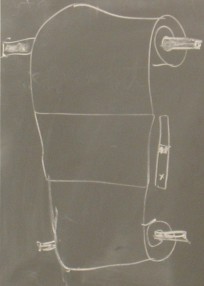
Why they’re called “scrollbars”

May 6th, 2005

Chalkboard drawing: a web page on a paper scroll.

Drawn by Prof. Goguen in CSE 271.